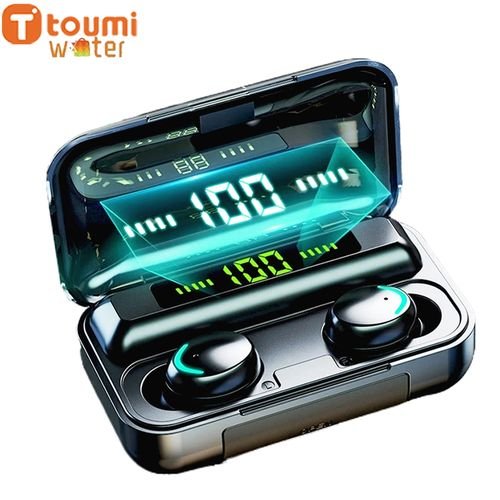
Specification:About 5 hours music time/talk time for the 1 time fully charged earphones by 70& volume,? 40 times for the charging box to charge the earphonesEasy touch control by touching earphones for volume up/down, Play/Pause Song, Next/Previous Song, activate/deactivate Siri, power on/off, Answer/Reject callBluetooth 5.0Charging box size: 3cm*4.5cm*7.5cm,earphones size: 2.1cm*2.3cm*1.3cmPackaging weight: 118g, 1 pcs earphone weight: 4.3gPackaging size: 9.2cm*11.5cm*4.5cm
FAQ:Q?Why one of my earphones stop working and stop charging after usage for some time?A: Please check if there is something blocking the charging points of the earphones. If there is, please use the toothpick to clean it.
Q:?Why it will cut-in sometimes?A:??If there is noise signal from nearby, the Bluetooth wireless earphone will be interfered by the noise signal. This will happen even in Apple’s Bluetooth earphones also. Keep away from the noise signal interference, it will not.
Q: What should I do if the signal freezes when using the headset?A:1. The power of the headset may be at a low value after leaving the factory, resulting in unstable signal. Please try to reconnect the headset after charging it in the charging compartment.2. If there is other signal interference in the environment, the jam will also occur. Please avoid signal interference as much as possible when using it.?Q: The left and right earphones cannot be?connected?successfully?A:When using the headset, you can follow the steps below:1. First unpair all the headset records that have been connected to the Bluetooth of the mobile phone, and then turn off the Bluetooth of the mobile phone2. Long press both earphones at the same time to turn off3. Long press the two earphones to turn on at the same time. After both earphones flash red and blue lights, double-click one of the earphones and wait for the two earphones to pair successfully4. Finally turn on the phone’s Bluetooth to search





Popular test
Uniformity of Dosage Units
Allschoolabs
Uniformity of Dosage Units is a specialised analytical laboratory service that assesses whether individual dosage units contain sufficiently consis...



![ANTI D TITRE – [Serum]](https://app.analysisafrica.com/backend/uploads/tests/images/1754385122_6891cae238432.jpg)









 No products in the cart.